We may earn a commission when you buy through links on this page, at no extra cost to you. How this works.
This checklist is designed for pet owners who rely on smart feeders, automated litter boxes, and connected cameras to keep their pets safe and comfortable while traveling. If you've invested in smart pet devices but worry about connectivity failures, app access issues, or running out of supplies mid-trip, this systematic protocol will help you test and validate every critical component before you leave home.
The stakes are higher when you're managing pet care remotely. A dropped WiFi connection, a forgotten app password, or an empty food hopper can turn a relaxing vacation into an emergency scramble. This checklist addresses the most common failure modes: network drops that lock you out of controls, permission settings that block remote access, backup power gaps during outages, consumable shortages you didn't anticipate, and edge cases you never tested under real conditions.
Whether you're leaving for a long weekend or two weeks, working through each section will give you confidence that your smart pet ecosystem can handle the routine - and the unexpected - while you're away. The goal is not perfection, but deliberate preparation that eliminates preventable problems and gives you a clear response plan when something does go wrong.
What Matters Most: The Five Critical Systems
Setting up smart pet devices before vacation requires more than downloading an app and filling a hopper - five critical systems must work together reliably when you're away. Network stability keeps your devices online, app and cloud access let you monitor and adjust remotely, power continuity prevents total shutdown during outages, consumable stock ensures your pet has enough food or clean litter, and real-time monitoring alerts you to problems before they escalate. Each system depends on the others: a full feeder is useless if the WiFi drops and the device can't dispense on schedule, and cloud access means nothing if the power fails without a backup. Understanding how these layers interact helps you identify single points of failure - like a router placed too far from devices, an account without two-factor authentication, or a litter box with only two days of tray capacity for a week-long trip. During multi-day absences, you won't be there to reboot a frozen camera or replace an empty food cartridge, so every system needs redundancy or a fallback. Network stability starts with router placement, dedicated 2.4 GHz bands for older devices, and confirming signal strength in each room where a device operates. App and cloud access means verifying login credentials, enabling notifications, setting up a backup contact with shared access, and confirming your phone plan supports data roaming if you're traveling internationally. Power continuity involves surge protectors, identifying which devices can run on battery backup, and knowing how long each device holds a charge or continues basic functions during an outage. Consumable stock requires calculating daily usage, adding a safety margin, and choosing devices with transparent level indicators or low-supply alerts. Real-time monitoring ties it all together - camera uptime, feeder jam alerts, litter box error codes, and app-based health checks let you catch issues early and coordinate a neighbor or pet sitter to intervene. When one system weakens, the others can't fully compensate: strong WiFi won't help if you're locked out of your account, and plenty of food won't matter if a power surge disables the dispenser. Before you leave, test each system under realistic conditions - disable WiFi briefly to see which devices reconnect automatically, simulate a power interruption to confirm backup behavior, and verify that notifications reach your phone with enough detail to diagnose the problem remotely. This layered approach turns a collection of gadgets into a dependable care routine that functions whether you're gone for a weekend or two weeks.
Common Mistakes to Avoid
Even experienced pet owners make setup errors that can turn a relaxing vacation into a stressful emergency. Avoiding a few high-impact mistakes will keep your smart pet devices running smoothly while you're away.
The most common pitfall is assuming your WiFi signal is strong enough without actually testing it where the device sits. Smart feeders, litter boxes, and cameras need stable connectivity - walk to each device location with your phone and verify signal strength before you leave. If bars drop below three, relocate the router or add a mesh extender.
Overfilling feeders past the maximum fill line causes jams and motor strain. Follow the manufacturer's capacity marks exactly, and remember that a partially filled hopper is safer than one stuffed to the brim. Similarly, skipping uninterruptible power supply (UPS) backup leaves your devices vulnerable to brief outages that can reset schedules or trigger offline alerts.
Never update device firmware the night before departure. Updates can introduce bugs, change settings, or require re-pairing - schedule firmware upgrades at least three days ahead so you have time to troubleshoot. Equally important is briefing your pet sitter on manual override procedures: show them how to open the feeder lid, scoop litter manually, and reset the camera if it goes offline.
Finally, test remote app access from outside your home network before you travel. Connect via cellular data or a friend's WiFi to confirm you can view cameras, trigger feedings, and receive notifications. Discovering access issues from the airport is too late to fix them.
By sidestepping these mistakes, you give your smart pet setup the best chance to work flawlessly from the moment you walk out the door until you return home.
Final Takeaway: Build Your Pre-Departure Routine
Smart pet devices give you visibility and control when you travel, but only if you prepare them systematically before you leave. Peace of mind comes from methodical setup, not luck or last-minute taps on an app screen. Save this checklist as your go-to protocol for every trip - whether it's a weekend getaway or a two-week vacation - and you'll eliminate the guesswork that turns a relaxing trip into a constant worry about what might be going wrong at home.
The single highest-return step in this entire process is the 48-hour advance test. Running your feeders, litter boxes, cameras, and fountains under real-world conditions for two full days gives you the window to catch WiFi dropouts, low batteries, food jamming, app notification failures, and backup contact gaps while you still have time to fix them. If a device fails on day one of testing, you have 24 hours to troubleshoot, swap batteries, reconfigure settings, or arrange a neighbor check-in. If it fails on day one of your trip, your options shrink to frantic texts and expensive early returns.
Reliability isn't a feature your devices ship with - it's the result of checking firmware versions, confirming app permissions, topping off consumables, testing backup power, verifying camera angles, and making sure every person on your emergency contact list knows how to open your app and override a missed meal. Build this routine into your pre-departure schedule the same way you handle mail holds and thermostat adjustments, and you'll board your flight knowing the system at home is as solid as you can make it.
Bookmark this guide and return to it before every trip. If you've discovered device-specific tips, backup strategies, or testing shortcuts that work for your setup, share them in the comments - your experience helps other pet parents travel with confidence.
Network & Connectivity Pre-Flight
- Verify each device shows strong WiFi signal (not just connected, but -65 dBm or better if your app displays it)
- Confirm router firmware is current and scheduled auto-reboots are disabled during your trip
- Test remote app access from outside your home network (use cellular data, not home WiFi)
- Document your router admin credentials and ISP support number in a secure note
- Set up secondary contact (pet sitter, neighbor) with WiFi password in case you need them to power-cycle equipment
App Permissions & Account Access
- Enable push notifications for every pet device app and verify test alerts arrive on your phone
- Check that app background refresh is enabled (iOS Settings > General > Background App Refresh)
- Confirm your account email and phone number are current in each app
- Log out and log back in to verify credentials work and no 2FA issues block you
- Update all pet device apps to latest version at least 48 hours before departure to catch any bugs
Power Continuity & Backup Planning
- Plug critical devices (feeder, camera) into UPS battery backup, not just surge protector
- Test UPS by unplugging it from wall - ensure devices stay online for at least 10 minutes
- Label each power adapter and take photos of cable routing for pet sitter reference
- Confirm no scheduled power outages in your area during travel dates
- Leave UPS manual and pet sitter instructions for manual device restart if needed
Consumable Inventory & Capacity Planning
- Calculate daily food dispensed × trip days + 3-day buffer, then fill feeder hopper
- Store backup food supply in airtight container with clear label for pet sitter
- For self-cleaning litter boxes, ensure waste drawer is empty and liner bag is fresh
- Stock extra litter (20-30% more than usual weekly consumption) in accessible location
- Photograph current hopper/litter levels and share with pet sitter as baseline
Device Health & Simulation Testing
- Run every device on the actual vacation schedule for 48 hours before departure
- Trigger at least one manual feed and one manual litter clean via app to verify remote control
- Check camera live view at different times of day (morning, afternoon, evening) for video quality
- Simulate power interruption: unplug each device for 10 seconds, plug back in, confirm it reconnects
- Review app error logs or notifications from the test period and resolve any warnings
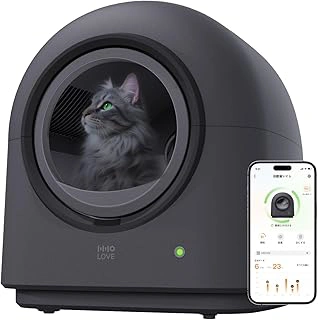
HHOLOVE TYPro Self Cleaning Cat Litter Box
Automated litter boxes like the HHOLOVE TYPro Self Cleaning Cat Litter Box demand more than a quick plug-in before you leave. Run three to five full cleaning cycles over several days to confirm the unit completes each rotation without jamming, that sensors detect your cat reliably, and that the waste drawer locks securely. This burn-in period reveals mechanical quirks - clumping litter buildup, motor hesitation, or drawer misalignment - that won't announce themselves until day two of your trip.
Once cleaning cycles run smoothly, test the app-triggered manual clean from outside your home WiFi network. Walk to a neighbor's property or use mobile data, then command a cleaning cycle and watch for the push notification confirming completion. If the remote trigger fails or the notification never arrives, troubleshoot network settings and app permissions now, not from the airport.
Check waste drawer capacity against your cat's habits and trip length. Even reliable units fill faster than expected when you're not home to monitor usage. Empty the drawer completely, mark the current litter level, then calculate whether one full drawer will last your entire absence or if you need a pet sitter to check midweek. Sensor accuracy matters too: place a small object in the litter basin and verify the unit pauses cleaning when motion is detected, preventing accidental injury if your cat jumps in mid-cycle.
Multi-day testing catches the issues that single trial runs miss. Automated litter systems depend on consistent power, stable WiFi, correct litter type, and predictable cat behavior. A three-day test run before departure gives you time to adjust settings, swap litter brands if clumping fails, or arrange backup care if the unit proves less reliable than hoped.
- ✅ Self-cleaning cycles reduce daily maintenance
- ✅ App control allows remote manual cleaning
- ✅ Sensors detect cat presence during operation
- ⚠️ Requires multi-day burn-in testing to confirm reliability
- ⚠️ Waste drawer capacity may not suit long trips without midweek checks
- ⚠️ Performance depends on litter type and clumping consistency
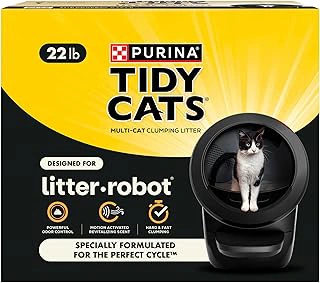
Purina Tidy Cats Clumping Odor Control Cat Litter for Litter-Robot
Automated litter boxes rely on consistent clumping to trigger sensors accurately, and Purina Tidy Cats Clumping Odor Control Cat Litter for Litter-Robot is formulated for exactly that purpose. The tight clumps help the unit's weight sensors detect waste reliably, reducing the chance of partial cycles or sensor errors while you're away. Odor control becomes especially important during multi-day absences, and this litter is designed to seal in ammonia and waste odors between cleaning cycles.
Switching litter brands immediately before vacation is a common mistake. Cats can be sensitive to texture and scent changes, and an unfamiliar litter may lead to avoidance or litter-box aversion right when you need consistent use. If you plan to use this product, introduce it at least one to two weeks before you leave so your cat adjusts and you can observe clumping performance and sensor accuracy under normal conditions.
Stock a backup bag and leave it sealed with your pet sitter's supplies. Automated units can consume litter faster than expected if your cat has digestive changes or if the unit cycles more frequently. Having a reserve on hand helps reduce the chance of your sitter from guessing which product to buy or inadvertently choosing an incompatible formula that could jam the rake or confuse the sensors.
This litter is priced at $19.98 and has earned a 4.4 out of 5 rating. For households using Litter-Robot or similar automated systems, verified compatibility and reliable clumping make it a practical choice for unattended operation.
- ✅ Formulated for Litter-Robot sensor accuracy
- ✅ Tight clumping supports reliable waste detection
- ✅ Odor control designed for extended cycles
- ✅ 4.4/5 rating
- ⚠️ Cats may need one to two weeks to adjust to new litter
- ⚠️ Automated units can deplete litter faster than manual scooping
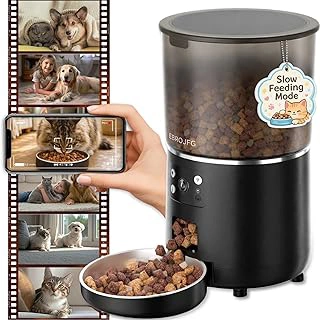
Automatic Cat Feeder with Camera, 4L Capacity, Smart App Remote Monitoring
An automatic feeder with an integrated camera solves two pre-vacation challenges at once: maintaining a consistent feeding schedule and giving you visual confirmation that your cat is eating. The 4L hopper holds enough dry food for several days, depending on portion size and the number of pets, which reduces the risk of running out mid-trip.
Before you leave, schedule at least three test meals using the smart app to confirm the dispense mechanism works reliably and portions are accurate. Check the camera feed in different lighting conditions - especially early morning and evening - to verify clarity when your home is darker. Test the two-way audio feature so you can call your cat or respond if you notice unusual behavior on camera. Practice using the manual dispense button in the app; this backup control is useful if you need to adjust portions remotely or reward your pet unexpectedly.
Compare the 4L capacity against your trip duration to ensure the hopper will last without requiring a refill. For example, if you dispense two multiple-gram meals per day, the feeder holds roughly a week's supply for one cat. Double-check that the camera angle captures the bowl clearly so you can see whether food was eaten or ignored. Confirm the app notifications are enabled for low-food alerts and dispense confirmations, then store the WiFi network name and password in case you need to troubleshoot connectivity while away.
- ✅ 4L capacity supports multi-day trips for most single-cat households
- ✅ Camera provides real-time visual confirmation of feeding activity
- ✅ Two-way audio allows remote interaction
- ✅ Manual dispense button offers flexible portion control from app
- ⚠️ Camera clarity depends on ambient lighting in the room
- ⚠️ Requires stable WiFi connection for remote monitoring
- ⚠️ Capacity may be insufficient for multiple pets or longer vacations
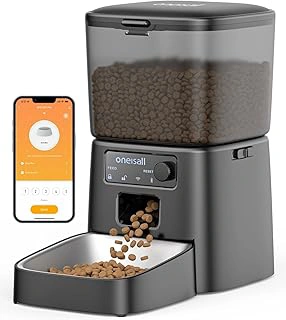
oneisall Automatic Cat Feeder with WiFi, App & Portion Control
The oneisall Automatic Cat Feeder offers WiFi connectivity, app-based scheduling, and portion control at $49.99, making it a practical choice for shorter vacations or as a secondary feeding station in multi-pet households. You can adjust meal times and portion sizes remotely through the app, which is useful when travel delays extend your trip or your pet's routine needs tweaking on the fly.
WiFi reliability is central to remote feeding management - this feeder connects to your home network and lets you monitor scheduled dispensing from anywhere with internet access. Portion control helps maintain consistent feeding amounts across multiple daily meals, reducing the risk of overfeeding when you're not there to supervise. The price point positions it as a cost-effective option for pet parents who want app control without the premium of built-in cameras or advanced sensors.
For multi-pet homes, this feeder works well as a redundant feeding point alongside a primary station, ensuring backup coverage if one device experiences a power interruption or connectivity hiccup. The compact footprint fits easily on countertops or low shelves, and the transparent hopper lets you visually confirm food levels before departure. If your vacation is a long weekend or week-long trip and you're pairing feeders with a separate camera system, this model delivers scheduling flexibility without overlapping features you already have.
Consider trip length and monitoring priorities when choosing between standalone feeders and camera-equipped models - shorter trips often need reliable scheduling more than real-time video, while extended vacations benefit from visual confirmation that meals dispensed correctly. The oneisall feeder handles the scheduling and portion accuracy; pair it with a standalone pet camera if you want independent video feeds and feeding automation on separate systems.
- ✅ WiFi app control for remote schedule adjustments during travel
- ✅ Portion control for consistent meal sizes across multiple feedings
- ✅ $49.99 price makes it budget-friendly for multi-feeder setups
- ⚠️ No built-in camera for visual meal confirmation
- ⚠️ Requires stable home WiFi for remote access