We may earn a commission when you buy through links on this page, at no extra cost to you. How this works.
Choosing pet tech that fits into your Apple HomeKit setup requires understanding the difference between native certification and third-party workarounds - and knowing which trade-offs matter most for your household. HomeKit-certified devices communicate directly with your iPhone, iPad, or HomePod without requiring separate apps or cloud services, while non-certified devices often need Homebridge adapters or manufacturer-specific platforms to bridge the gap. The decision affects not just convenience, but also long-term reliability, privacy, and whether automation routines work seamlessly when you leave the house or ask Siri to check on your pet.
Pet cameras, automatic feeders, and smart doors each present different integration challenges. Cameras demand stable video streams and secure authentication; feeders need dependable scheduling and portion control; smart doors require fail-safe lock mechanisms and real-time notifications. Some manufacturers pursue formal HomeKit certification, while others rely on Matter protocol support or community-built Homebridge plugins. Each path carries trade-offs in setup complexity, update frequency, and feature parity with the manufacturer's native app.
This guide walks through a decision matrix that compares certification status, protocol compatibility, feature sets, and practical usability. You'll learn which device categories have strong HomeKit options, where gaps still exist, and how to evaluate whether a workaround solution offers the stability your routine demands. The goal is to match your integration priorities - whether that's voice control, automation triggers, or centralized monitoring - with devices that deliver those features reliably over months and software updates, not just on installation day.
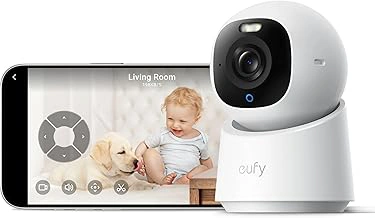
eufy Indoor Cam E30 4K Security Camera, Pan-Tilt, Auto Tracking, Color Night Vision
The eufy Indoor Cam E30 delivers 4K resolution and motorized pan-tilt coverage, making it easier to keep a moving pet in view without adjusting the camera manually. AI-powered auto tracking follows your pet across the room, and color night vision maintains detail even in low light - useful when monitoring crate rest or overnight activity.
This model relies on eufy's own app ecosystem and does not natively support HomeKit. Users who need Apple Home integration typically route video through Homebridge or similar third-party solutions, which introduce setup complexity and may limit real-time responsiveness. The trade-off is access to 4K clarity and intelligent tracking features that many HomeKit-native cameras omit at this price.
Pan-tilt motors cover a wide area, reducing blind spots in corners or behind furniture where pets often hide. Auto tracking works best in well-lit rooms with minimal visual clutter; busy patterns or rapid movement can occasionally cause the camera to lag or lose focus. Color night vision provides more recognizable detail than infrared alone, helping you distinguish between a pet and a shadow during nighttime checks.
At $46.99, the E30 offers strong imaging and motion features for pet owners willing to work outside the native HomeKit workflow. If seamless Apple Home control is a priority, budget for third-party bridge hardware and configuration time, or consider a camera with certified HomeKit support and simpler onboarding.
- ✅ 4K resolution captures fine detail for active pet monitoring
- ✅ Pan-tilt motors and AI tracking follow pets across the room
- ✅ Color night vision maintains clarity in low light
- ✅ Competitive price for the feature set
- ⚠️ No native HomeKit support; requires third-party bridge
- ⚠️ Auto tracking can lag in cluttered or fast-moving scenes
- ⚠️ Setup complexity increases when routing through Homebridge
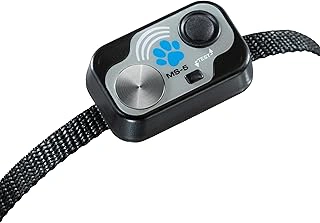
High Tech Pet MS-5 Automatic Pet Door Collar for Power Pet Doors, Water Resistant
Selective entry and exit control for multi-pet households often depends on collar-based automation, and the High Tech Pet MS-5 Automatic Pet Door Collar is designed to work exclusively with High Tech Pet Power Pet Doors. This water-resistant collar transmits a signal to compatible door units, triggering the motorized panel to open when the pet wearing the collar approaches. The system allows one pet to use an automatic door while preventing others - or neighborhood animals - from entering.
The collar itself does not include native Apple HomeKit support. Power Pet Door systems that accept the MS-5 collar typically operate as standalone radio-frequency units, relying on proximity detection rather than Wi-Fi or Thread connectivity. Integrating this hardware into a HomeKit environment requires a third-party bridge or smart relay capable of interfacing with low-voltage door controls, and even then, remote unlock commands may not replicate the selective, per-pet logic the collar provides. For households prioritizing single-pet automation without cloud dependence, the RF approach offers reliability; for those building unified smart-home routines, the lack of direct protocol compatibility limits automation scenarios.
Water resistance is a practical feature for pets that spend time outdoors in wet conditions, though the collar should still be removed during swimming or bathing to preserve electronics and battery contacts. The unit operates on replaceable batteries, and runtime varies with frequency of door activations. At $54.99, the MS-5 represents a lower-cost entry point compared to full RFID or app-enabled pet doors, but the trade-off is minimal integration flexibility and dependence on the specific Power Pet Door hardware ecosystem. If your goal is to layer pet access into broader HomeKit scenes or automate based on occupancy or time of day, alternative products with Matter or HomeKit certification will deliver tighter platform integration, even at higher price points.
- ✅ Water-resistant design for outdoor use
- ✅ Enables selective entry and exit in multi-pet homes
- ✅ Works on replaceable batteries with no Wi-Fi required
- ⚠️ No native Apple HomeKit or Wi-Fi connectivity
- ⚠️ Compatible only with High Tech Pet Power Pet Door models
- ⚠️ Requires third-party bridge for any smart-home integration
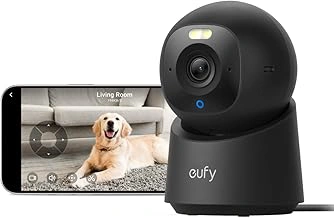
eufy Security 4K Indoor Camera E30 with 360° Pan Tilt, AI Tracking & Color Night Vision
The eufy Security 4K Indoor Camera E30 adds full 360° horizontal pan and tilt coverage for room-wide monitoring, combined with 4K resolution and on-device AI tracking that follows movement without requiring a cloud subscription. The motorized pan-tilt mechanism responds to motion within the frame, while color night vision provides detail in low light that standard infrared modes miss.
HomeKit integration requires eufy's HomeBase or compatible hub in most configurations, and live-view latency can vary depending on your network and whether you're viewing through the eufy app or Apple Home. The 4K sensor delivers sharper detail than earlier multipleK eufy models, useful when you need to identify small objects or read pet tags at a distance, though higher resolution also means larger file sizes if you enable local recording.
AI tracking locks onto pets and people, reducing the number of static-trigger false alerts common in fixed cameras. The camera stores event clips locally on a microSD card (sold separately), so you retain footage without monthly fees. Pan-tilt range covers the full horizontal plane and approximately the listed amount° vertical tilt, enough to follow a dog moving across a room or monitor a cat perch.
Color night vision uses ambient light and image processing to maintain color information in dim conditions, which helps distinguish between pets and objects more easily than monochrome infrared. Setup involves the eufy Security app, firmware updates, and - if you want HomeKit Secure Video - pairing through HomeBase and ensuring your iCloud plan includes sufficient storage. The camera measures approximately the listed size in diameter, small enough for a shelf or countertop without blocking sightlines.
At $54.99, the E30 sits between basic static cameras and premium models with dual-lens setups. The trade-off: you gain motorized tracking and 4K detail but rely on eufy's ecosystem for full feature access. If you already use eufy products or want a single camera that adapts to movement across a large space, the E30 provides flexible coverage. If you prefer native HomeKit without additional hubs, confirm your setup supports direct pairing or plan to use the eufy app as your primary interface.
- ✅ Full 360° pan and 96° tilt for room-wide coverage
- ✅ 4K resolution with on-device AI tracking
- ✅ Color night vision maintains detail in low light
- ✅ Local storage on microSD (no required subscription)
- ⚠️ HomeKit integration typically requires eufy HomeBase
- ⚠️ Live-view latency depends on network and app used
- ⚠️ MicroSD card sold separately for local recording
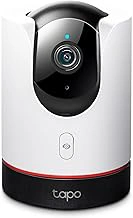
TP-Link Tapo 2K QHD Pan/Tilt Wi-Fi Camera C225, Apple HomeKit, Color Night Vision
The TP-Link Tapo C225 delivers native Apple HomeKit compatibility at a lower price point than many competitors, combining 2K QHD resolution with pan-tilt functionality and color night vision. For households monitoring pet activity across larger rooms or multiple zones, the multiple° horizontal and multiple° vertical pan-tilt range allows remote adjustment through the Home app without repositioning the camera physically.
The 2K QHD sensor captures enough detail to distinguish pet behavior and facial expressions at typical indoor distances, though it won't match the clarity of 4K models when digitally zooming on smaller pets or fine detail. Color night vision uses ambient light and integrated spotlights to render nighttime footage in full color rather than black-and-white, making it easier to identify pets by coat color or locate toys in low light.
HomeKit integration is certified and built-in, meaning the camera appears in the Home app immediately after initial setup through the Tapo app. Live view, motion alerts, and basic automation triggers work natively without third-party bridges or ongoing subscription requirements for HomeKit functionality. The pan-tilt motors respond to manual control in the Home app, though automated patrol patterns require the Tapo app.
At $38.99, this camera offers a practical entry point for HomeKit users who want mechanical coverage flexibility without the cost of premium 4K pan-tilt models. The trade-off is lower resolution when zooming and slightly narrower advanced feature sets compared to higher-tier competitors. For monitoring general pet movement, feeding areas, or play zones in well-lit to moderately dim spaces, the combination of native HomeKit support, motorized adjustment, and color night vision delivers functional coverage at a budget-friendly price.
- ✅ Native Apple HomeKit certification with no bridge required
- ✅ 360° pan and 114° tilt for adjustable room coverage
- ✅ Color night vision for easier pet identification in low light
- ✅ 2K QHD resolution suitable for typical indoor monitoring distances
- ✅ Lower price point compared to 4K pan-tilt HomeKit cameras
- ⚠️ 2K resolution provides less detail than 4K models when digitally zooming
- ⚠️ Automated patrol patterns require separate Tapo app outside HomeKit
- ⚠️ Color night vision performance depends on ambient light availability
Who This Is For
This guide is designed for pet owners who already use Apple devices daily and want their pet tech to integrate natively with the Home app. If you rely on iPhone, iPad, or HomePod to control lights, locks, and thermostats, adding pet cameras, feeders, or doors to that same ecosystem eliminates app-switching and simplifies routines.
You'll benefit most if you prioritize privacy and local processing over cloud-dependent services. HomeKit's end-to-end encryption and on-device automation appeal to anyone cautious about third-party data collection or subscription fees for basic features.
This approach works well for busy professionals who need quick status checks between meetings, families managing feeding schedules across multiple zones, or anyone who prefers Siri voice commands and Apple Watch shortcuts over opening separate apps. If you're comfortable with slightly higher upfront costs in exchange for tighter security and seamless control, native HomeKit support delivers clear advantages over bridge-based workarounds or standalone platforms.
Understanding HomeKit Certification vs. Third-Party Bridges
HomeKit-compatible pet devices fall into two categories: officially certified products that work out of the box, and devices that connect through third-party bridge software like Homebridge or HOOBS. Certified devices carry the "Works with Apple HomeKit" badge and integrate directly through Apple's secure framework, requiring only a quick pairing code scan to add them to your Home app. Bridge-based solutions, on the other hand, use open-source middleware running on a Raspberry Pi or dedicated server to translate protocols between non-certified devices and HomeKit.
The trade-off is setup complexity versus device selection. Official HomeKit pet cameras, feeders, and doors typically offer simpler installation, encrypted authentication, and warranty support that covers HomeKit features. Bridge setups demand technical comfort - installing software, maintaining updates, and troubleshooting connection drops - but unlock hundreds of pet products that were never designed for Apple's ecosystem. Stability differs too: certified devices reconnect automatically after network interruptions, while bridges may require manual restarts or plugin updates when manufacturers change their APIs.
Security is another consideration. HomeKit certification means Apple has audited the device's encryption and authentication methods, and all communication stays within your local network unless you enable remote access through a home hub. Bridges introduce an extra layer of software, and the security depends on how well you configure and update that middleware. For most households, the convenience and peace of mind of certified devices outweigh the broader selection that bridges provide, especially when dealing with pet safety features like automated doors or feeding schedules.
How to Choose the Right Device for Your Setup
Choosing the right HomeKit pet device begins with confirming official certification - look for the "Works with Apple HomeKit" badge on packaging or in the manufacturer's specifications to ensure native integration without workarounds. Once certification is verified, match the device's connectivity protocol to your home network infrastructure: Thread devices require a HomePod mini or Apple TV 4K as a border router and offer lower power draw and more stable mesh performance, while Wi-Fi models work with any existing router but may demand stronger signal strength in the installation area.
Camera resolution and field-of-view specs directly affect how well you can monitor your pet's behavior and surroundings. A 1080p sensor with at least a 130-degree horizontal view covers most room corners, while 2K or higher resolution becomes useful if you need to zoom digitally during playback without losing clarity. Evaluate whether the camera's night vision uses infrared LEDs - which produce a faint red glow - or invisible 940 nm emitters, especially if your pet is sensitive to light cues during sleep hours.
Storage architecture shapes both ongoing cost and privacy: local recording to microSD or a hub keeps footage entirely under your control and avoids subscription fees, but limits remote access and automated clip organization. Cloud plans typically add person and pet detection, activity zones, and cross-device syncing, yet introduce monthly or annual costs that can exceed the hardware price over two years. Check whether the device offers a hybrid model, storing recent clips locally while optionally uploading tagged events to the cloud.
Feature parity between the manufacturer's native app and the Apple Home app often differs - automation triggers, two-way audio quality settings, and advanced scheduling may only be accessible in the brand's own interface. Test both apps during any return window to confirm that the controls you use daily are available in your preferred environment. Compare devices side-by-side using a spec sheet that lists certification status, protocol support, resolution, storage options, and app feature tables to surface trade-offs before committing to a purchase.
Beyond Cameras: Feeders, Doors, and Sensors
HomeKit-compatible pet cameras represent the majority of certified devices, but feeders, automatic doors, and environmental sensors are slowly entering the ecosystem with important caveats. Most smart feeders and doors require a manufacturer bridge or hub to connect to HomeKit, adding cost and complexity compared to native camera integrations. You'll typically configure the device in its native app first, then expose limited controls - such as manual feed commands or door lock status - to the Home app.
Feeders that work with HomeKit usually allow you to trigger a dispense action through automations or Siri, but scheduling, portion control, and food-level monitoring often remain exclusive to the manufacturer's app. Automatic pet doors face similar restrictions: HomeKit may show lock/unlock status and let you control access remotely, but curfew schedules, pet-specific RFID entry, and activity logs typically live outside Apple's ecosystem.
Environmental sensors - temperature, humidity, and motion detectors marketed for pet areas - can integrate via HomeKit-certified hubs like Aqara or Eve, but dedicated pet-health metrics won't appear in the Home app. If your priority is a unified smart-home experience with voice control and basic remote triggers, bridge-based feeders and doors deliver that foundation. If you need granular feeding schedules, detailed entry logs, or pet-specific analytics, plan to use the manufacturer's app alongside HomeKit and evaluate whether the added convenience justifies managing two interfaces.
Final Takeaway
Choosing pet tech for Apple HomeKit comes down to four clear decisions: verify the product carries official HomeKit certification, confirm the wireless protocol matches your home setup, review subscription terms before you rely on any feature, and plan to test everything during the return window.
HomeKit certification is not negotiable - third-party bridges and workarounds introduce points of failure that can leave you without remote access or notifications when you need them most. Check the product page for the Works with Apple Home badge, and verify the protocol (Wi-Fi, Thread, or Bluetooth) fits your router coverage, mesh capacity, and future expansion plans.
Subscription costs add up quickly. A camera that looks budget-friendly may require ongoing payments for motion alerts or cloud recording, while a feeder with a higher upfront price may include local storage and lifetime notifications. Map out the first-year total cost and decide which features you will actually use daily versus those that sound appealing in marketing copy.
Real-world reliability only shows up after installation. Use the return window to confirm the camera stays connected during internet hiccups, the feeder dispenses accurately across kibble sizes, or the door responds to automations without lag. Compare the product's behavior against the manufacturer's spec sheet, and be willing to return devices that under-deliver on range, responsiveness, or build quality.
Take the time to compare specs side-by-side, read the fine print on cloud services, and validate manufacturer claims with your own setup. Informed decisions now prevent frustration, wasted subscriptions, and incompatible devices later.
What Matters Most in HomeKit Pet Tech
- Official HomeKit certification vs. HomeKit-via-Homebridge workarounds
- Thread, Wi-Fi, or Bluetooth: which protocol fits your home network
- Native features vs. features locked to manufacturer apps
- Local vs. cloud video storage and subscription requirements
- Two-way audio quality and latency for real-time interaction
- Pan-tilt, tracking, and night vision capabilities for pet monitoring
Common Mistakes to Avoid
- Assuming all works with Apple Home claims mean official HomeKit certification
- Ignoring firmware update frequency and manufacturer support history
- Overlooking subscription costs for cloud storage or advanced features
- Choosing Wi-Fi devices without checking router band and capacity
- Skipping manufacturer app review - some features remain app-locked
- Forgetting to verify multi-user access and Siri control scope